# Start Solve and Verify

Once [Truebit on Ethereum has started](/v1docs/getting-started/start-truebit-on-ethereum.md):

**1. Start Solver using account 0.**

```bash
start solve -a 0
```

<mark style="color:purple;">**OUTPUT**</mark>

{% code overflow="wrap" %}

```bash
info: SOLVER initialized at block 6794618.
```

{% endcode %}

**2. Start Verify using account 1.**

```bash
start verify -a 1
```

<mark style="color:purple;">**OUTPUT**</mark>

{% code overflow="wrap" %}

```bash
info: VERIFIER initialized at block 6795600
```

{% endcode %}

**3. Check if the Solver or Verifier is active.**

```bash
truebit-os:> ps
```

<mark style="color:purple;">**OUTPUT**</mark>

{% code overflow="wrap" %}

```bash
SOLVERS Account 0: 0x2F25f5DF360305977Fef8F6730883a787785B802
VERIFIERS Account 1: 0x353510EF7b01b4BAAd9616ae23d344c5945c6771
```

{% endcode %}

**4. Balances before start.**

<figure><img src="/files/2oIuPJUACAUismZNn68a" alt=""><figcaption><p>Balances before start</p></figcaption></figure>

**5. Create a task from the Task Giver terminal.**

```bash
task -f factorial.json submit -a 0
```

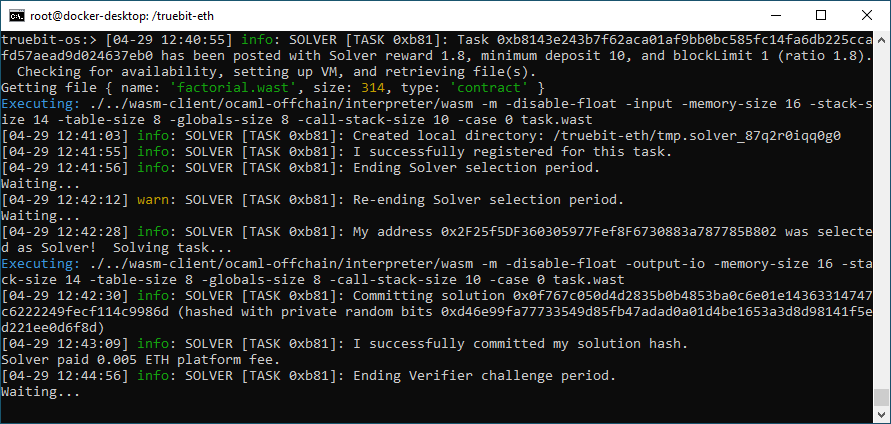
**6. Monitor task execution in each account's terminal.**

<figure><img src="/files/Ct2WihDTD5RTZirN0Q2Q" alt=""><figcaption><p>Task Giver terminal</p></figcaption></figure>

<figure><img src="/files/YpxLdFdGU440URB2pFLf" alt=""><figcaption><p>Solver terminal</p></figcaption></figure>

<figure><img src="/files/5daQAHIZpL3DTZNaqKoW" alt=""><figcaption><p>Solver payment</p></figcaption></figure>

<figure><img src="/files/axzcl83TLTU1KR6WeHMb" alt=""><figcaption><p>Verifier terminal</p></figcaption></figure>

<figure><img src="/files/zFALimswpYNy139X31Eg" alt=""><figcaption><p>Payment</p></figcaption></figure>


---

# Agent Instructions: Querying This Documentation

If you need additional information that is not directly available in this page, you can query the documentation dynamically by asking a question.

Perform an HTTP GET request on the current page URL with the `ask` query parameter:

```
GET https://docs.truebit.io/v1docs/getting-started/start-solve-and-verify.md?ask=<question>
```

The question should be specific, self-contained, and written in natural language.
The response will contain a direct answer to the question and relevant excerpts and sources from the documentation.

Use this mechanism when the answer is not explicitly present in the current page, you need clarification or additional context, or you want to retrieve related documentation sections.